To submit an advance payment request, open the Advance Payments app, press the “+” button, and select ADVANCE PAYMENT.

Choose the type of advance payment from the list.

You can change the applicant and add people to be informed. Click on the field you want to modify and select the appropriate person from the list.

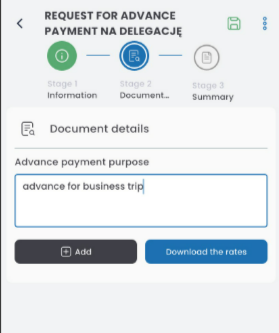
In the DETAILS tab, enter the purpose of the advance payment and click the ADD button.
In the advance payment card, enter the amount, select the currency, and choose the payment method. You can add another item or save it using the disk icon, or delete it with the trash can icon.

The items will be saved in the SUMMARY section.

In the SUMMARY tab, enter the bank account number (if the account number is already registered in your ORG profile, it will be automatically filled in). To select the advance payment date, click the calendar icon and choose the date. Tick the box for the advance payment settlement obligation.

In the Approval Path tab, select the decision-maker and send the document for approval by clicking the paper plane icon.